
Welcome to Trial & Deposition Technologies at PhillyLegalNews.com — a dedicated hub focused on the real-world tools, systems, and strategies used in modern trial practice and deposition work. One of the most effective ways to understand modern trial and deposition technologies is to see how they are applied in real-world educational demonstrations and presentation workflows.
Over the course of my career, I have worked at the intersection of courtroom technology, litigation support, and trial presentation, helping attorneys effectively communicate complex evidence to judges and juries.
This page highlights:
- The technologies used in trial and deposition settings
- Real-world demonstrations and teaching programs
- Video presentations and training sessions
- Practical workflows used in courtrooms across the country
From early courtroom presentation systems to today’s remote, multi-location deposition and trial environments, the goal has always remained the same:
👉 Make information clearer, more persuasive, and easier for jurors to understand.
Trial Technology in Action (Video Demonstrations)
One of the most powerful ways to understand trial technology is to see it in action.
Remote & Interactive Deposition Technology
The video below is part of the FDCC Trial Masters program, demonstrating how modern technology allows attorneys and professionals to collaborate and present evidence across multiple locations in real time.
In this example:
- Participants were located in New Jersey, Switzerland, Seattle, and Australia
- The session demonstrated remote presentation, exhibit sharing, and coordinated trial workflows
- The focus was on how technology can replicate — and in some cases enhance — the traditional courtroom environment
FDCC Trial Masters: Trial Technology in Action
▶️ Watch the full demonstration on YouTubeFDCC Evolve & the Growth of Trial Technology Education
As courtroom technology continued to evolve, educational programs such as FDCC Evolve helped introduce attorneys and litigation professionals to modern trial presentation systems, remote collaboration tools, and emerging deposition technology workflows.
Programs like FDCC Evolve focused on demonstrating how technology could improve courtroom communication, visual presentation, exhibit management, and overall trial preparation strategy.
The following presentation reflects some of the early educational efforts designed to help legal professionals better understand the growing role of technology within modern litigation practice.
Topics Highlighted
👉 Remote collaboration and coordinated presentation workflows
👉 Trial presentation and exhibit technology
👉 Demonstration-based legal technology education
👉 The evolution of courtroom communication tools
👉 Technology integration within litigation practice and trial preparation
Educational & Historical Context
This presentation was part of the early FDCC Evolve educational initiative focused on modern trial technology and litigation support workflows.
The program reflected the growing importance of technology within courtroom presentation, remote collaboration, and visual communication strategy as litigation workflows continued to evolve.
▶️ Video Demonstration: FDCC Evolve Trial Technology Program
External Recognition, Educational References & Historical Trial Technology Resources
As courtroom technology, synchronized evidence presentation, and multimedia litigation workflows continued evolving, educational initiatives such as FDCC Evolve and Tech U helped introduce attorneys and litigation professionals to modern trial presentation systems, visual communication strategy, remote collaboration workflows, and integrated litigation-support technologies.
These programs focused on helping attorneys better understand how courtroom technology could improve witness examination, exhibit presentation, jury communication, trial preparation, and overall courtroom effectiveness. Educational demonstrations often emphasized not only the use of technology itself, but also the strategic importance of organizing digital evidence, building presentation-ready case files, and communicating complex information more clearly and persuasively.
The FDCC Evolve initiative and its broader courtroom technology programs were also recognized and discussed by legal-technology author Stephen Embry in articles examining how the Federation of Defense & Corporate Counsel (FDCC) embraced modern litigation technology education and trial-presentation strategy.
These articles and educational references provide additional historical and institutional context regarding the growth of courtroom technology education, litigation-support workflows, interactive presentation strategy, and trial-technology training programs involving FDCC, Tech U, and related educational initiatives.
▶️ TechLaw Crossroads — FDCC Evolve Initiative
For Once Lawyers Embrace Technology: FDCC and the EVOLVE Initiative
▶️ Legal Business World — FDCC Evolve & Trial Technology Discussion
Legal Business World – Stephen Embry Article PDF
▶️ FDCC Trial Technology Educational Presentation (2015)
FDCC Trial Technology Presentation PDF
▶️ FDCC Evolve / Tech U Program Reference (2018)
FDCC Flyer Spring 2018 PDF
Exhibits Inserted in Video Deposition | Trial Demonstration with Animation (IADC Seminar)
This educational demonstration shows how exhibits can be inserted into a video deposition and later used effectively during trial presentation.
Created as a teaching tool for the International Association of Defense Counsel (IADC), this example was presented during a seminar focused on trial technology, deposition strategy, and courtroom communication techniques.
The individual testifying in the clip is an attorney portraying a witness for instructional purposes as part of the seminar presentation.
Demonstration Overview
This example illustrates how animation and demonstrative evidence can be integrated directly alongside deposition testimony to help:
- Clarify complex facts
- Direct attention to key details
- Improve visual understanding
- Keep the jury focused during playback
- Create a cleaner and more persuasive presentation
The demonstration highlights how visual evidence and testimony can work together within a single presentation environment rather than forcing jurors to mentally separate testimony from the supporting exhibits.
Key Techniques Demonstrated
👉 Split-Screen Presentation
The witness and visual evidence are displayed together so the audience can simultaneously observe testimony and referenced exhibit material.
👉 Exhibit Animation Integration
Animation is inserted alongside the testimony to visually reinforce and clarify the points being discussed by the witness.
👉 Real-Time & Post-Production Workflow
The presentation demonstrates how these techniques can be implemented either:
- in real time during the deposition, or
- during post-production editing after the deposition has concluded.
👉 Trial Playback Strategy
These integrated video clips can later be used effectively during:
- Opening statements
- Witness examinations
- Cross-examination
- Closing arguments
👉 Visual Jury Focus Techniques
The format helps direct attention toward the evidence while preserving the context of the witness testimony itself.
Strategic Impact
By combining testimony with synchronized visual evidence, attorneys and trial teams can:
- Simplify technical or performance-based concepts
- Improve jury retention and understanding
- Present evidence more efficiently
- Create a more organized and persuasive presentation
- Enhance overall courtroom communication
Additional IADC Educational References
The International Association of Defense Counsel (IADC) has long explored the evolving role of courtroom technology, multimedia evidence presentation, synchronized testimony, visual communication strategy, and modern litigation-support workflows within trial practice and deposition preparation.
Educational seminars and technology demonstrations developed through IADC programming focused on helping attorneys better understand how integrated presentation systems, digital exhibits, animation, synchronized video testimony, and courtroom communication strategies could improve jury understanding and overall trial effectiveness.
The following educational material provides additional historical context regarding the use of technology within modern litigation and courtroom presentation environments.
▶️ IADC Trial Technology Educational Reference (2016)
IADC Technology Committee Educational PDF
▶️ IADC Summer Docket (2016)
IADC Summer Docket 2016 PDF
Educational & Demonstrative Use
This demonstration was created solely for educational and instructional purposes as part of an IADC seminar presentation focused on modern trial technology and courtroom presentation strategy.
The presentation illustrates general deposition and trial presentation workflows and does not reflect substantive witness testimony from an actual trial proceeding.
▶️ Video Demonstration: Exhibits Inserted in Video Deposition
Trial Presentation & Interactive Deposition Technology
Interactive Deposition Technology Using Smartboards & TrialDirector
This demonstration shows how smart technology can be integrated with trial presentation software to create a fully interactive deposition environment. By combining tools like Smartboards with TrialDirector, attorneys can capture a witness’s real-time markings directly onto documents, radiological films, photographs, and other exhibits.
This approach transforms a traditional deposition into a dynamic, visual process—preserving testimony, annotations, and demonstrative evidence in a way that is far more impactful for later use at trial.
👉 In this example:
- Witnesses interact directly with exhibits in real time
- Markings and annotations are captured and preserved digitally
- Complex evidence—such as medical imaging and photographs—is explained more clearly
- The record becomes more visual, precise, and persuasive
▶️ Watch the Demonstration
Interactive Deposition Technology in Practice
One of the most effective ways to understand deposition technology is to see how it is applied in real-world litigation. The following example demonstrates how video integration, exhibit control, and post-production presentation techniques can transform deposition testimony into a more understandable and persuasive trial presentation tool.
Example: Video-in-Video Deposition Presentation
This educational demonstration highlights the use of video-in-video deposition technology, split-screen presentation techniques, and post-production exhibit integration used during trial preparation and trial playback.
The example was derived from a case tried in the United States District Court in Philadelphia involving complex factual and performance-based evidence requiring clear visual communication for the jury.
Importantly, this demonstration focuses on presentation strategy and visual integration techniques — not the substance of witness testimony. The audio was intentionally removed from this clip so the emphasis remains on the technology and presentation workflow itself.
The deposition shown was taken as a trial deposition because the witness was unavailable to appear live at trial.
Key Techniques Demonstrated
👉 Split-Screen Presentation
The witness and exhibit initially appear side-by-side, allowing the jury to simultaneously observe testimony and visual evidence.
👉 Picture-in-Picture (Video-in-Video) Repositioning
The witness is later repositioned into the corner of the screen so the jury’s focus shifts directly to the visual performance evidence.
👉 Pre-Marked Video Exhibits
The video clips shown during the deposition were pre-marked with exhibit identifiers before the deposition took place, preserving a clean and organized trial presentation workflow.
👉 Post-Production Enhancement
After the deposition, additional terminology and exhibit labeling were superimposed based upon the witness’s identification testimony, helping simplify complex performance-based evidence for trial playback.
👉 Visual Jury Focus Techniques
The presentation demonstrates how attorneys can guide juror attention toward the evidence itself while still preserving the witness testimony within the frame.
Strategic Impact
These presentation techniques help:
- Focus the jury’s attention on the evidence rather than solely on the witness
- Improve clarity during trial playback
- Enhance understanding of technical or performance-based evidence
- Preserve a cleaner and more organized trial record
- Create a more persuasive and visually understandable presentation
Educational & Demonstrative Use
The source performance clips shown during this demonstration were obtained from publicly available online video sources and were used solely for educational and demonstrative purposes within this technology presentation.
This example was originally presented during a Technology & Depositions seminar conducted with Bob Christie for the FDCC as part of a broader discussion on modern deposition presentation techniques and trial technology workflows.
Stacking Techniques for Trial Presentation & Closing Argument
This example demonstrates an additional presentation technique used during closing argument known as “stacking.”
Stacking is a presentation method used to organize and display multiple related video exhibits simultaneously within a single trial presentation format. The goal is to simplify complex visual evidence and allow the jury to view multiple performance references in a concise and organized manner.
Like the previous example, this demonstration focuses on presentation strategy and visual communication techniques rather than the substance of witness testimony. The audio was intentionally removed so the emphasis remains on the visual workflow and exhibit presentation methodology.
Technique Demonstrated
In this presentation:
- Multiple video performance clips were layered and organized together within a single presentation slide
- The witness testimony video remained visible while the referenced performances were displayed alongside the witness
- The presentation allowed the jury to simultaneously observe:
- the witness
- the referenced movements
- comparative visual examples
- the sequence and relationship between the exhibits
This created a more efficient and visually understandable presentation during closing argument.
Strategic Purpose of “Stacking”
The stacking technique was designed to:
👉 Consolidate multiple video exhibits into one understandable presentation
👉 Reduce the need to repeatedly stop and start separate video clips
👉 Allow jurors to visually compare multiple referenced performances at one time
👉 Reinforce witness testimony using coordinated visual references
👉 Increase jury retention and overall presentation impact during closing argument
Trial Presentation Impact
By combining:
- witness testimony,
- synchronized visual references,
- and stacked exhibit presentation,
the presentation became a cleaner and more persuasive method of communicating complex performance-based evidence to the jury.
Rather than forcing jurors to mentally reconstruct multiple separate clips, the stacked presentation organized the evidence into a more direct and visually efficient format.
Educational & Demonstrative Use
The source performance clips shown in this demonstration were obtained from publicly available online video sources and were used solely for educational and demonstrative purposes within this technology presentation.
This example was originally presented during a Technology & Depositions seminar conducted with Bob Christie for the FDCC as part of a broader discussion on modern deposition presentation workflows and trial technology strategy.
Interactive Deposition Strategy: Defendant Driver Viewing Eyewitness Video Testimony
This interactive deposition demonstration shows a defendant truck driver being confronted with videotaped eyewitness testimony during questioning. The witness is shown clips from the eyewitness’ recorded deposition and asked to comment on the truth, accuracy, and veracity of the testimony in real time.
The presentation intentionally creates a “video within a video” effect so viewers can observe exactly what the defendant driver was watching during the deposition. The slight ghosting visible in the demonstration results from the presentation being reformatted for educational viewing purposes. During the actual deposition, the driver was watching the eyewitness clip directly while being questioned by counsel.
This example highlights the creative use of synchronized video testimony, impeachment strategy, and advanced deposition presentation technology in modern litigation. By using recorded eyewitness testimony interactively during the deposition itself, counsel was able to create immediate credibility tension and a powerful visual presentation strategy for a future jury audience.
Topics Covered
- Interactive deposition presentation
- Video-within-video litigation strategy
- Witness confrontation using videotaped testimony
- Advanced impeachment presentation techniques
- Synchronized deposition video workflows
- Jury-focused visual communication strategy
- Trial and deposition technology applications
Educational Note
This clip is presented for educational and professional discussion purposes as part of the Philly Legal News Trial & Deposition Technologies archive, which explores the evolution of courtroom presentation systems, synchronized video testimony, and litigation-support workflows.
Watch the Interactive Deposition Demonstration
Surveillance Video and the Missing Timeline: Creating the Backstory Through Digital Evidence
This presentation explores how surveillance video often captures only a small portion of an event while leaving out the larger factual context surrounding what actually occurred. Using a brief 38-second surveillance clip as an example, the program examines how lawyers, litigation-support professionals, and trial teams can reconstruct the “backstory” through witness testimony, digital photographs, documents, demonstrative exhibits, and synchronized video presentation technology.
The presentation also demonstrates how multimedia evidence can be blended together to create more effective and understandable presentations for mediators, arbitrators, judges, and juries. Rather than relying solely on a single surveillance angle, the discussion emphasizes the importance of developing the complete factual timeline and presenting the broader context surrounding an event.
Topics explored include surveillance video interpretation, timeline reconstruction, witness testimony integration, digital evidence blending, multimedia litigation presentation, jury-focused visual communication, and modern trial and deposition technology strategy.
This presentation is part of the Philly Legal News Trial & Deposition Technologies educational archive examining courtroom presentation systems, synchronized video testimony, digital evidence workflows, and litigation-support technology.
Watch the Presentation
Early Paperless Deposition Demonstrations Using TrialDirector
Long before cloud-based litigation platforms, Zoom proceedings, and remote exhibit-sharing systems became commonplace, early “paperless deposition” workflows were already transforming how attorneys organized evidence, questioned witnesses, and prepared cases for trial.
The following educational demonstrations explored how TrialDirector presentation software, synchronized digital exhibits, multiple presentation screens, and integrated courtroom technology systems could be used not only during depositions, but also to simultaneously build a reusable digital case file for future depositions, mediation, arbitration, and eventual trial presentation.
One of the key concepts demonstrated throughout these programs was that a properly organized paperless deposition system was not simply about eliminating paper. Instead, the deposition itself became part of a larger litigation workflow where electronically organized exhibits, searchable testimony, synchronized video clips, and presentation-ready evidence could continue evolving throughout the life of the case.
These demonstrations also highlighted the use of multiple presentation monitors, integrated document-display systems, and Elmo visual presentation technology working together within a coordinated litigation-support environment.
Paperless Deposition Demonstration — Part I
This early educational demonstration explores how TrialDirector and digital exhibit systems could be used to organize, present, preserve, and later reuse deposition evidence throughout the litigation process. The presentation focuses on how attorneys could begin building a structured digital trial file during discovery depositions themselves rather than waiting until trial preparation.
▶️ Watch the educational demonstration on YouTube:
Paperless Deposition Demonstration — Part II: TrialDirector Presentation Screen & Case Library Workflow
This educational demonstration highlights how TrialDirector’s Case Library and indexing systems could be used to organize, retrieve, and present digital evidence during paperless depositions and later trial presentation workflows.
The presentation explores how electronically stored exhibits, searchable document databases, and integrated presentation screens allowed attorneys and litigation-support professionals to create a more efficient and organized litigation environment long before cloud-based trial platforms and remote workflows became commonplace.
One of the key concepts demonstrated in this workflow was that paperless depositions were not simply about replacing paper documents with digital files. Instead, the deposition process itself became part of a larger litigation-support strategy where exhibits, testimony, annotations, and presentation materials could continue evolving throughout the life cycle of the case.
The demonstration also shows how multiple presentation screens, synchronized exhibit displays, and integrated document-presentation systems — including Elmo technology — could work together within a coordinated deposition and trial-support environment.
▶️ Watch the educational demonstration on YouTube:
Paperless Deposition – Part II: Presentation Screen Workflow
Interactive Medical Deposition Technology Demonstration
This educational demonstration highlights the use of interactive deposition technology during medical testimony presentations involving radiology evidence and digital exhibit annotation. Originally used in teaching programs and seminars presented through Temple University’s LL.M. in Trial Advocacy program, the International Association of Defense Counsel (IADC), the Federation of Defense & Corporate Counsel (FDCC), and other litigation-technology lectures, the demonstration shows how attorneys and expert witnesses can interact directly with medical imaging during deposition testimony. Using a Sympodium interactive display together with TrialDirector presentation software, the medical expert is able to digitally mark, annotate, and explain the X-ray in real time while the testimony is preserved for future courtroom presentation. The process allows the jury to simultaneously observe: • the witness testimony, • the radiology image, • and the actual digital markups being created during the deposition. This approach helps eliminate confusion about what the witness is referencing and creates a clearer, more engaging presentation of technical medical evidence for trial, mediation, arbitration, and settlement presentations. The demonstration also illustrates how deposition clips and synchronized digital annotations can later be edited, organized, and presented during opening statements, witness examinations, cross-examinations, and closing arguments.Watch the Demonstration
Temple University LL.M. Trial Advocacy
Early Integrated Multimedia Deposition Demonstration
This archival demonstration from Temple University Beasley School of Law’s LL.M. in Trial Advocacy program illustrates an early example of integrated multimedia deposition technology and courtroom communication training involving synchronized demonstrative evidence, layered video presentation workflows, and litigation storytelling methodology. The mock deposition features Professor Barbara Lynn Ashcroft as the witness, with questioning conducted by Jack Delany, Esq., while synchronized video exhibits appear simultaneously within the deposition presentation system as part of a broader mock trial educational exercise developed for LL.M. students. Temple LL.M. Trial Advocacy | Early Integrated Video Deposition DemonstrationTemple LL.M. Trial Advocacy Tech Boot Camp — Mock Deposition Demonstration
This educational deposition demonstration was created as part of the Trial Technology Boot Camp conducted for students enrolled in Temple University Beasley School of Law’s LL.M. in Trial Advocacy Program.
In this teaching exercise, Professor Barbara Lynn Ashcroft, Esq. serves as the witness, Jack Delany, Esq. conducts the examination, and Thomas G. Oakes administers the oath and preserves the official record as court reporter.
The purpose of the exercise was to demonstrate the foundational deposition process that ultimately serves as the basis for modern trial presentation technology. Before synchronized transcripts, exhibit callouts, impeachment clips, video-in-video presentations, and TrialDirector courtroom presentations can be created, attorneys must first obtain properly recorded sworn testimony.
One of the most important aspects of the demonstration is the administration of the oath. The oath transforms a conversation into sworn testimony given under penalty of perjury and establishes the evidentiary foundation upon which later courtroom presentations depend.
This clip intentionally presents the deposition in its basic form, without synchronized exhibits or enhanced presentation features, allowing students to understand how raw deposition video becomes the building block for more advanced courtroom technology workflows.
The demonstration was created as part of Temple’s hands-on trial advocacy training program to help future trial lawyers better understand deposition practice, witness examination, courtroom communication, and litigation technology.
Participants
- Barbara Lynn Ashcroft, Esq. — Witness
- Jack Delany, Esq. — Examining Attorney
- Thomas G. Oakes — Court Reporter and Administrator of the Oath
Educational Topics:
- Depositions
- Trial Advocacy
- Courtroom Technology
- TrialDirector Workflows
- Witness Examination
- Sworn Testimony
- Video Depositions
- Litigation Technology
- Temple LL.M. Trial Advocacy Program
Note: This video was originally recorded as part of a classroom teaching exercise and appears in YouTube’s Shorts format due to its original recording orientation. The content is presented for educational and historical purposes within the Philly Legal News Legal Education, Trial Technology & Professional Archive.
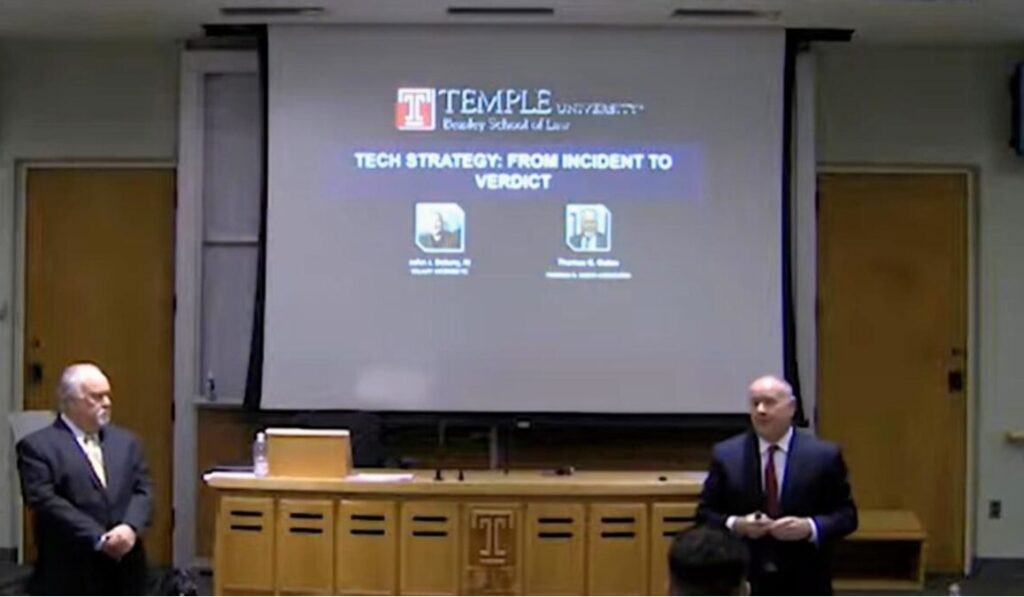
TECH STRATEGY: FROM INCIDENT TO VERDICT — Temple LL.M. in Trial Advocacy
This long-form educational seminar was presented as part of Temple University Beasley School of Law’s LL.M. in Trial Advocacy program. In this program, Thomas G. Oakes and Jack Delany, Esq. discuss how trial technology can be used strategically throughout the life cycle of a case — from the initial incident through verdict.
The presentation explores trial technology not merely as a way to display exhibits, but as a system for organizing facts, building timelines, presenting digital evidence, explaining witness testimony, and communicating effectively with mediators, arbitrators, judges, and juries.
Topics discussed include digital evidence, surveillance analysis, interactive depositions, demonstrative exhibits, witness testimony integration, multimedia litigation presentation, courtroom communication, and trial preparation strategy.
This video is part of the Philly Legal News Trial & Deposition Technologies educational archive, preserving teaching materials, seminar presentations, and courtroom-technology lessons developed through decades of litigation-support and trial-presentation experience.
▶️ Watch the Full Temple University Trial Technology Seminar on YouTube
Educational & Institutional References
Temple University Beasley School of Law’s LL.M. in Trial Advocacy program has long been recognized for its practical, hands-on approach to courtroom advocacy, litigation strategy, witness examination, and modern trial presentation techniques.
The program integrated technology directly into advocacy instruction, helping attorneys understand how courtroom presentation systems, multimedia evidence, synchronized video testimony, digital exhibits, and visual communication strategies could improve modern trial practice and jury understanding.
The educational seminars and demonstrations referenced throughout this section were developed within the broader context of Temple University’s nationally recognized trial advocacy and litigation-education environment.
Additional information regarding Temple University’s LL.M. in Trial Advocacy curriculum and faculty can be found here:
▶️ Temple University LL.M. Trial Advocacy Curriculum
Temple LL.M. Trial Advocacy Curriculum
▶️ Temple University LL.M. Trial Advocacy Faculty
Temple LL.M. Trial Advocacy Faculty
The Temple LL.M. program and its broader trial advocacy initiatives were also highlighted in Temple Law’s ESQ publication discussing the development of advocacy training and experiential legal education programs.
▶️ Temple Law ESQ Winter 2014 Publication
Temple Law ESQ Winter 2014 PDF
Continue Exploring
Interested in the evolution of courtroom technology, trial advocacy education, TrialDirector training, interactive depositions, and professional legal technology programs? Visit the Legal Education, Trial Technology & Professional Archive for historical resources, educational materials, photographs, videos, and professional program archives.
Frequently Asked Questions About Trial & Deposition Technologies
What is trial presentation technology?
Trial presentation technology includes the software, hardware, and techniques used to organize and present evidence during litigation, arbitration, mediation, and trial. These tools help attorneys display exhibits, video depositions, timelines, photographs, and demonstrative evidence in a clear and persuasive manner.What is TrialDirector?
TrialDirector is one of the most widely used litigation presentation platforms in the legal profession. It allows attorneys and litigation support professionals to organize exhibits, synchronize video depositions, create impeachment clips, and present evidence in court or during remote proceedings.What is TrialPad?
TrialPad is an iPad-based trial presentation application that enables attorneys to display exhibits, highlight key evidence, annotate documents, and present materials during trial, mediation, arbitration, and settlement conferences.What are interactive depositions?
Interactive depositions combine synchronized video testimony, transcript text, exhibits, and presentation technology into a single searchable resource. This allows attorneys to quickly locate testimony, prepare video clips, and present deposition evidence more effectively.Why is courtroom technology important?
Courtroom technology helps attorneys communicate complex information more effectively to judges, juries, arbitrators, and mediators. Visual presentation tools can improve understanding, increase engagement, and enhance the overall presentation of evidence.How has trial technology evolved over the years?
Trial technology has evolved from paper exhibits, easels, and overhead projectors to sophisticated digital presentation systems. Modern litigation technology includes synchronized video depositions, real-time transcript integration, digital exhibit management, cloud-based case access, and mobile presentation platforms.What is the role of a trial technology consultant?
A trial technology consultant assists attorneys with evidence organization, exhibit management, video deposition preparation, courtroom presentation systems, and the technical aspects of presenting evidence during trial and other legal proceedings.How are video depositions used at trial?
Video depositions may be used for impeachment, witness testimony, expert presentations, and evidentiary purposes. Modern presentation software allows attorneys to create designated clips, synchronize testimony with transcripts, and integrate exhibits directly into the presentation.What technologies are commonly used in modern litigation?
Common litigation technologies include TrialDirector, TrialPad, video deposition software, electronic exhibit management systems, timeline presentation tools, transcript synchronization platforms, real-time court reporting technology, and digital evidence presentation systems.Where can I learn more about trial advocacy and courtroom technology?
Additional educational materials, photographs, videos, and historical resources are available in the Legal Education, Trial Technology & Professional Archive, which documents professional education programs, trial advocacy instruction, and courtroom technology initiatives spanning several decades.About the Author — Thomas G. Oakes
Thomas G. Oakes is a 45+ year legal professional in Philadelphia and the founder/editor of PhillyLegalNews.com and PhillyLegalConnect.com. He served for many years as an official court reporter in the Philadelphia Court of Common Pleas and the U.S. District Court for the Eastern District of Pennsylvania, and has worked as a freelance court reporter in state and federal courts for decades.
He holds the highest national court reporter certifications through rigorous testing, including credentials from the National Court Reporters Association and multiple state associations, including Pennsylvania, New Jersey, Delaware, and Maryland. Tom was also the principal of Thomas G. Oakes Associates, a Philadelphia-based litigation support and trial technology firm serving attorneys nationwide for more than 33 years.
In addition to courtroom work, Tom is a nationally recognized leader in trial technology and a Certified TrialDirector Trainer. He has trained lawyers, judges, law clerks, paralegals, and trial teams in courtroom presentation and technology, and taught in Temple University’s LL.M. in Trial Advocacy program (with special recognition).
He has lectured at bar associations throughout Pennsylvania and nationally for organizations including the Federation of Defense and Corporate Counsel (FDCC), the International Association of Defense Counsel (IADC), and the American Bar Association (ABA). He is also a co-founder of the FDCC Evolve program and an instructor in the FDCC Deposition Boot Camp.
Award: Temple University LL.M. in Trial Advocacy — 2013 Faculty Award for “Art of Technology in the Courtroom.”
Disclaimer
This article is for general informational and educational purposes only and does not constitute legal advice. Reading this content does not create an attorney–client relationship. If you need legal advice about a specific situation, consult a qualified attorney in the appropriate jurisdiction.
Latest News & Flashbacks or Recent Posts in News & Technology