

By Thomas G. Oakes | Philadelphia Legal News
My purpose is to applaud Bob’s presentation and the LIT SOFTWARE team’s work, review the practical lessons they shared about using the iPad and LIT SUITE applications, and build on a question I raised during the webinar: how digital presentation can work alongside physical exhibits and tactile evidence. Bob’s response provides a natural connection to the blended approach to trial presentation I have long advocated.
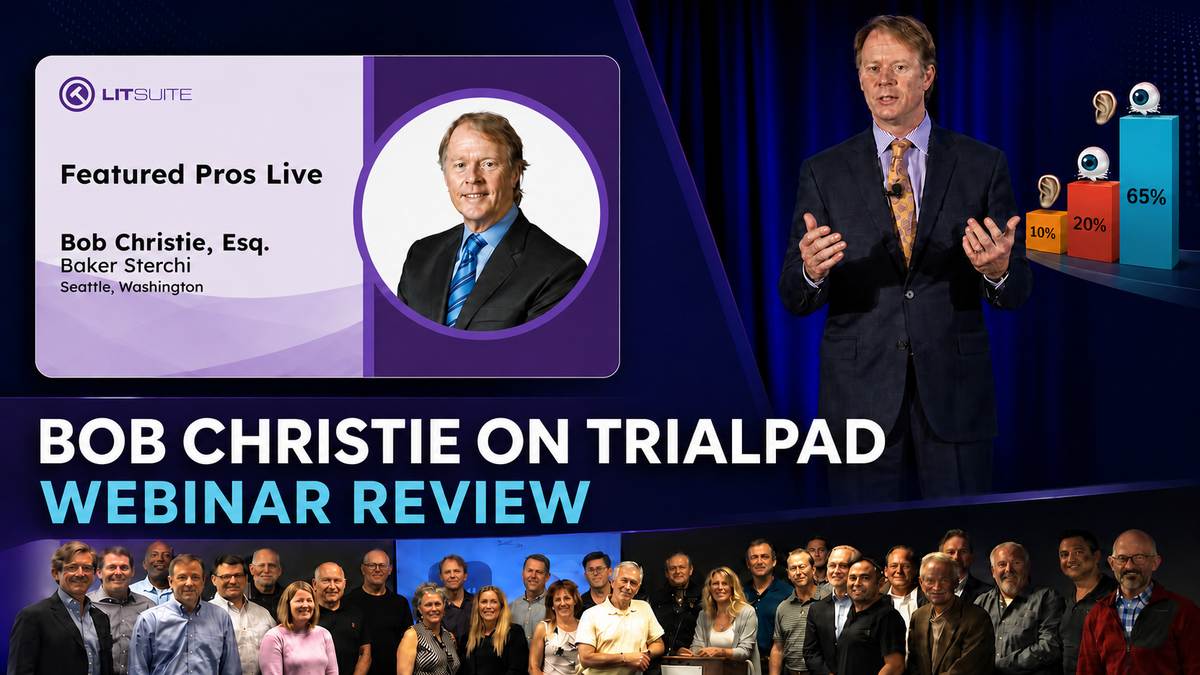
That is why I was pleased to attend LIT SOFTWARE’s webinar, Featured Pros Live with Bob Christie, Esq.. Hillary Hames guided the discussion, and Andrea Burton, Kevin Doran, and Tara Cheever joined from the Lit Software team. Bob was the featured practitioner, explaining how he uses the iPad and LIT SUITE applications—including TrialPad, TranscriptPad, and TimelinePad—throughout the life of a case.
Bob and I have presented seminars and taught together through the Federation of Defense & Corporate Counsel. For years, we also helped lead FDCC FedTech, a hands-on, boot-camp-style program devoted to trial technology in actual practice. I know Bob not only as an experienced trial lawyer, but also as a thoughtful teacher who understands that technology must serve the advocacy—not become the advocacy.
The webinar reflects one of LIT SOFTWARE’s real strengths: a practitioner-first approach to legal technology education. Rather than simply listing software features, the team gave an experienced trial lawyer the space to explain how the tools fit into preparation, witness examination, courtroom presentation, and the development of a case.
This is LIT SOFTWARE’s program, and its applications properly remain at the center of the discussion. My purpose is to applaud Bob’s presentation and the LIT SOFTWARE team’s work, review the practical lessons they shared, and then expand on one part of the conversation that overlaps directly with my own approach to trial presentation: blending digital presentation with physical and tactile evidence for today’s jurors.
Quick Answer – The Central Lesson
Bob Christie explains how he uses TrialPad and the broader LIT SUITE to organize cases early, control courtroom visuals, and work with testimony and timelines. His central practical lesson is that effective use depends on preparation, familiarity with the tools, and courtroom readiness.
In response to my audience question, Bob also explained why digital presentation still belongs alongside foam-core boards, printed images, and tangible objects. That exchange provides the starting point for my additional discussion of blending trial technologies.
Sometimes that medium is TrialPad, TranscriptPad, or TimelinePad. Sometimes it is a foam board, a printed photograph, or a tangible object placed directly before the jury. The skill lies in knowing which tool belongs at which moment.
Key Takeaways
- TrialPad can give the presenting lawyer direct control over the timing of the visual and verbal message.
- Effective direct control depends on preparation, practice, and a well-organized exhibit set.
- Bob begins organizing the visual case early rather than waiting until trial approaches.
- LIT SOFTWARE designed its applications to work together across presentation, transcript, and chronology tasks.
- Courtroom technology should be tested and backed up before it is used in front of a judge or jury.
- Digital presentation does not eliminate the value of foam boards, printed images, or tangible evidence.
- My live webinar question prompted Bob’s extended discussion of blending physical and digital media.
The technology changed; Bob’s commitment to visual advocacy did not
Bob begins with a story from 1996. Important information was buried in a document, and he needed to make the critical language visible to the fact-finder. At that time, document callouts had to be selected and created in advance, stored on a laser disc, and triggered through a barcode system.
That story is more than a look back at older equipment. It shows that Bob was thinking seriously about visual advocacy long before the iPad existed. He understood that simply handing a document to the jury did not guarantee that jurors would recognize the sentence that mattered.
The communication problem is still with us. A jury can receive a document and still miss its most important language. The trial lawyer must decide how much context the jury needs, where attention should move, and when the critical point should appear.
Technology does not identify the important evidence. It helps a prepared lawyer teach it.
That distinction runs throughout Bob’s presentation. The value of TrialPad is not simply that it can enlarge, highlight, or display an exhibit. Its value is that the lawyer can connect the visual to the question, the witness, and the precise moment in the examination.
LIT SOFTWARE deserves credit for developing an application that supports that kind of lawyer-directed presentation without requiring the technology to dominate the courtroom.
TrialPad and the power of controlling the visual message
One of Bob’s strongest points concerns direct presentation control.
We have all watched an examination stop while a lawyer instructs someone else to find a document:
Bring up Exhibit 5. No, the other Exhibit 5. Go to page three. Scroll down. Enlarge the second paragraph.
The witness waits. The lawyer waits. The jury watches the presentation process instead of the evidence.
Bob explains that TrialPad allows him to control the timing himself. The full exhibit can appear with the foundational question. The callout can follow when the witness reaches the important language. The visual and verbal messages move together.
Bob has developed an impressive level of comfort with the technology. His demonstration shows what is possible when a lawyer knows both the case and the presentation system well enough to operate them as one coordinated process.
This is also where TrialPad’s design shines. The application gives a prepared lawyer a practical way to organize exhibits, move between full pages and focused callouts, mark admitted items, and keep the visual presentation aligned with the examination.
Direct control still depends on preparation. For many lawyers, the best approach may include pre-treating the most important documents before the examination.
Pre-treating means preparing the callouts, highlights, arrows, and other display treatments in advance. The lawyer should already know what the jury will see first, what will receive emphasis, what will remain visible, and when the display will return to the full exhibit. Once those decisions are made and rehearsed, the technology can disappear into the examination.
For internal presentation purposes, the admitted exhibit might remain “Exhibit 1,” while prepared working files are labeled “Exhibit 1-A — Callout” and “Exhibit 1-B — Highlight and Arrow.” Those suffixes are internal presentation labels only. They do not change the admitted exhibit number or suggest that each treated view is a separate item of evidence.
The important point is that each iteration is prepared, tested, and ready to display. The lawyer can then focus on the witness and jury rather than constructing the presentation live.
My question to Bob: Do you still blend technologies?
At approximately 10:54 in the full webinar, Hillary Hames read a question I submitted from the audience:
Do you blend technologies—low-tech foam boards in addition to digital presentation—as the jury pool changes?
Bob’s answer was an emphatic yes.
He explained that he still uses foam-core boards for important material he wants to put up and leave visible. He uses physical imagery. When an object can properly be passed to the jury, he will consider using the object itself.
Bob then described a case involving a root-canal procedure. An expert dentist approached the jury with a tooth and demonstrated how a drill enters the root. The jurors were fascinated. Bob’s conclusion was that the demonstration would not have worked as effectively as an electronic image.
He called it a great question, thanked me during the answer, and thanked me again when he finished. More important than the personal acknowledgment was the substance of his response: trial lawyers should use more than one medium, and not every memorable presentation belongs on a screen.
I also appreciated the way Hillary and the LIT SOFTWARE team allowed the audience question to develop into a meaningful trial-practice discussion. That willingness to move beyond a narrow feature demonstration made the webinar more useful.
That exchange connects directly to my earlier PLN article, “Blending Trial Technologies: Reaching Today’s Jurors Where They Are.”
Foam boards still perform a job the screen cannot
A digital display is temporary. The screen changes from one exhibit to the next, and sometimes it goes dark so attention can return to the witness.
A carefully selected foam board can remain in the jury’s line of sight. It can become a visual anchor that survives changes in witnesses, documents, and presentation modes.
In my earlier article, I recommended identifying the top three exhibits that deserve that treatment. The number three is my practical recommendation; Bob’s webinar confirms his endorsement of foam-core boards but does not show him adopting that specific number.
The point is not to fill the courtroom with boards. It is to select the few images that deserve to remain visible and position them with purpose.
A standard printed photograph can also be powerful. During opening, holding an 8½-by-11-inch photograph may keep the jury’s eyes on the lawyer instead of sending everyone to the screen. The same image may later appear digitally as a callout and again as a board. Repetition across different media can reinforce the story without making the presentation feel repetitive.
Bob’s answer was especially valuable because it rejected the false choice between “high-tech” and “low-tech.” His approach—and the approach I have long recommended—is to use both when both serve the story.
Tactile evidence can create a different kind of understanding
A screen is observed from a distance. A physical object can be held, turned, and understood spatially.
That does not make every object appropriate for the jury. Admissibility, foundation, safety, handling, preservation, and the Court’s instructions all must be addressed. But Bob’s dental example illustrates the practical difference between seeing a picture of an object and watching how the object actually works.
The right question is not, “What is the newest technology available?”
The right question is, “Which medium helps this jury understand this evidence at this moment?”
Sometimes the answer is TrialPad. Sometimes it is synchronized video. Sometimes it is a board that remains visible. Sometimes it is a physical object in the expert’s hand.
Bob expressed that principle clearly and memorably. It was one of the strongest portions of an already excellent program.
The courtroom as theater—with the evidence at center stage
Bob describes the courtroom as a theater for presentation and lawyers as storytellers. His analogy works because he does not use “theater” to mean spectacle. He uses it to describe disciplined attention to placement, timing, movement, and communication.
Control the Message; Control the Courtroom
For accomplished trial lawyers, treating the courtroom as a stage means:
- the lawyer knows where to stand;
- the jury sees the full document before the isolated sentence;
- the callout appears when the testimony reaches it;
- the board remains visible when its point should endure;
- the screen is cleared when attention should return to the witness; and
- every medium enters at the correct place in the story.
The evidence remains at center stage. Bob’s presentation demonstrates how technology can support that discipline without becoming a distraction.
For a broader look at TrialPad’s courtroom-presentation tools and how the LIT SUITE applications work together, see my earlier guide to mastering trial presentation with TrialPad.
Bob’s “tech island” is really a lesson in courtroom readiness
Bob also describes operating as a self-contained “tech island.” He brings the iPad, Apple TV, projector, screen, table, cables, adapters, and other equipment he may need. He scouts the courtroom and prepares for a hardwired connection when wireless presentation is unavailable or prohibited.
That is excellent practical advice. A lawyer should not discover on the morning of trial that the courtroom has no compatible connection, that a private device cannot join the system, or that the available display cannot be seen from the jury box.
The larger lesson is readiness:
- Confirm the court’s security and audiovisual rules.
- Test the actual signal path from the presentation device to the display.
- Carry the adapters and cables you have already tested.
- Prepare a backup for every essential component.
- Know how the presentation will continue if the primary device fails.
Bob also suggests offering a short demonstration to a judge who is hesitant about courtroom technology. Competence builds confidence. A clean demonstration can show that the system will save time rather than consume it.
The LIT SOFTWARE team did a particularly good job drawing out these practical details. The result was not simply a discussion of what TrialPad can do; it was a useful lesson in how an experienced lawyer prepares to use it responsibly.
Build the visual case when the file arrives
Another strong webinar theme is Bob’s early organization.
He creates the TrialPad matter, begins identifying important documents, groups exhibits by witness, keeps a separate closing folder, and develops the chronology before trial is imminent. Those organized visuals can then support client meetings, depositions, mediation, motion practice, hearings, witness preparation, and trial.
This is where the broader LIT SUITE approach becomes especially compelling. TrialPad, TranscriptPad, TimelinePad, DocReviewPad,and ExhibitsPad are not presented as isolated applications. Together, they support different but connected parts of the litigation workflow: organizing the evidence, understanding the testimony, building the chronology, and presenting the case.
Bob’s official “TimelinePad: Building a Case From Day One” clip captures the principle, while “LIT SUITE Live: Organizing a Case in Real Time” shows more of the folder and timeline workflow.
I plan to examine that subject in a separate article. A useful chronology is not merely a row of dates. It can become a navigation system that leads the lawyer from an event to the witness, source document, and prepared presentation material supporting it.
Bob’s explanation gives lawyers a practical reason to begin that work early, and LIT SOFTWARE deserves credit for showing how its applications can support the process from the beginning of the case—not simply on the first day of trial.
TranscriptPad, TrialDirector, and Bob’s second reference to me
At approximately 20:57 in the webinar, Bob turns to synchronized deposition video. As he compares TranscriptPad with his earlier experience creating clips in TrialDirector. The context is clear: Bob was contrasting the multi-step process he experienced in TrialDirector with the speed and ease he finds in TranscriptPad.
LIT SOFTWARE’s short clip, “TranscriptPad: The Impeachment ‘Game Changer,’ shows why the workflow matters. When an unexpected impeachment issue arises, the lawyer can select the relevant transcript lines and play the synchronized video.
I agree with Bob that TranscriptPad makes on-the-fly clip creation remarkably direct: select the starting and ending transcript lines and play the synchronized excerpt. That ease of use is a meaningful accomplishment by the LIT SOFTWARE development team because it brings a technically demanding presentation task within the reach of a prepared lawyer working directly from an iPad.
The same general task can be accomplished in TrialDirector, but the courtroom workflow is different. During a fast-moving examination, many lawyers would want an experienced trial technologist operating TrialDirector. The lawyer might ask the technologist to play page 31, lines 5 through 17, and the technologist would select and publish the excerpt. A lawyer with sufficient TrialDirector training can perform that work personally, although doing so can divide attention during a demanding examination. Using a technologist often allows the examining attorney to maintain eye contact and concentrate on the witness and jury.
TranscriptPad gives a prepared lawyer the option of performing that task directly on the iPad without adding another pair of hands to the presentation chain.
Video communicates more than words on a page. Jurors can hear the voice, pause, hesitation, and emphasis and can observe the witness’s demeanor. On-the-fly capability is most effective when it rests on an organized case. Known designations and likely impeachment passages should still be checked, prepared, and rehearsed.
The goal is not merely to play a clip quickly. It is to present the correct passage, at the correct moment, with sufficient context and a clear record. Bob and the LIT SOFTWARE team explain that distinction exceptionally well.
My practical extension: pre-treat the exhibit sequence
Bob demonstrates treating documents with callouts and highlights and connecting documents to a TimelinePad event. I would take that preparation one step further by building the complete presentation sequence before the examination:
- Show the original exhibit in full.
- Highlight the relevant paragraph.
- Enlarge the paragraph as a prepared callout.
- Emphasize the precise sentence or phrase.
- Use a split view when the jury needs both context and detail.
- Add a related photograph or short video when it genuinely assists understanding.
- Return to the timeline or full exhibit.
That is my workflow extension, not a sequence Bob claimed to demonstrate in the webinar. It grows naturally from the preparation principles Bob teaches and from the capabilities the LIT SUITE applications bring together.
The shared principle is simple: make the important visual decisions during preparation so the lawyer can concentrate on the witness and jury in court.
Why blended presentation remains important
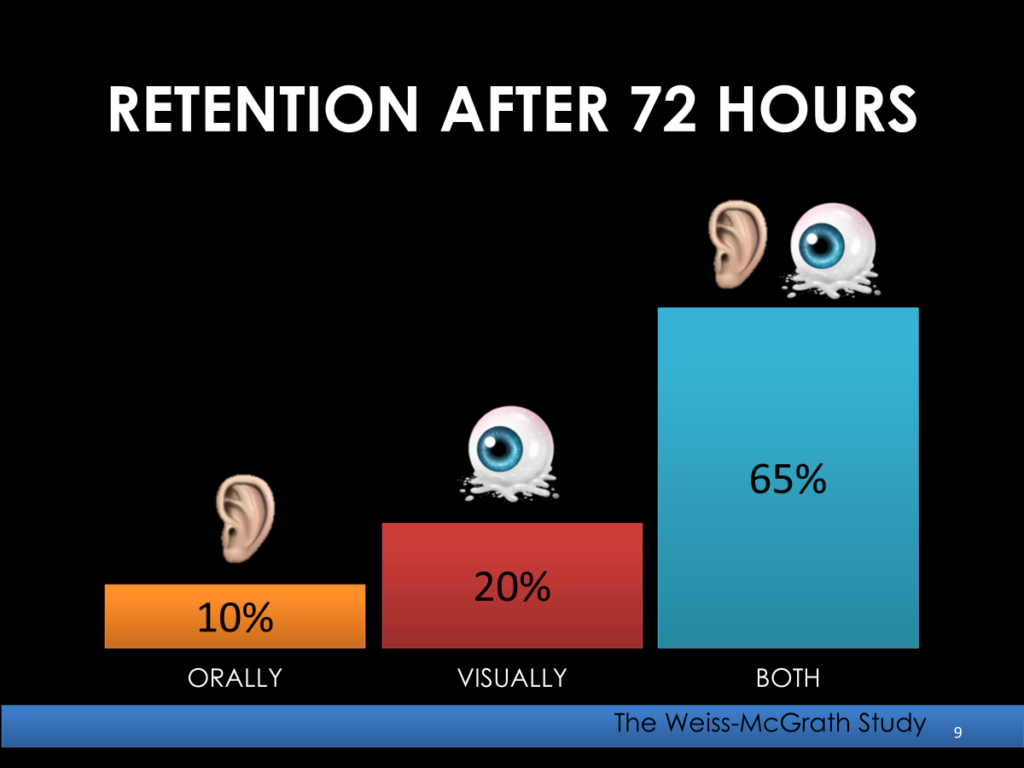
Blending trial technologies is about choosing the right medium for the point—not using every available tool.
TrialPad allows a lawyer to move from a complete exhibit to a focused callout. A foam-core board can keep a central image visible while the electronic display changes. A physical object can let an expert demonstrate a feature or movement that may be difficult to explain through a screen alone. Each serves a different purpose.
That practical judgment is central to the approach I discuss in Blending Trial Technologies: Reaching Today’s Jurors Where They Are. My emphasis is on planning what the jury should see, when it should appear, and which presentation method best supports the explanation.
That is why Bob’s response to my webinar question resonated with me. An experienced TrialPad user, he still makes room for foam-core boards, printed imagery, and tangible objects. His enthusiasm for digital presentation does not prevent him from recognizing when another medium serves the point better.
The question is not whether to use technology or traditional exhibits. It is how to combine them thoughtfully, with the evidence and the jury’s understanding at the center.
Final assessment: an excellent webinar grounded in real trial practice
The webinar succeeds because Bob does more than list software features. He connects TrialPad, TranscriptPad, and TimelinePad to repeatable trial-practice habits:
- organize early;
- scout the courtroom;
- carry what you need;
- control the timing of the visual message;
- prepare for technical problems;
- choose the medium that best teaches the point; and
- practice until the technology no longer competes with the examination.
Those lessons apply whether a lawyer uses TrialPad, TrialDirector, TimelinePad, TranscriptPad, PowerPoint, Keynote, a foam board, a printed photograph, a tangible object—or a deliberate combination of them.
My final takeaway is this:
The best trial technology is often the technology the jury stops noticing.
The jury should notice the evidence. It should understand the witness and follow the story. When the presentation system supports those goals without calling attention to itself, the technology has done its job.
Bob Christie deserves a round of applause for sharing the lessons he has developed through years of trial work. Hillary Hames and the entire LIT SOFTWARE team also deserve recognition for producing a webinar that respects the intelligence of its audience, highlights the capabilities of the LIT SUITE applications, and keeps the discussion grounded in the realities of litigation practice.
It is an excellent program, and I encourage trial lawyers, litigation-support professionals, and legal-technology educators to watch it in full.
- Watch the complete Featured Pros Live with Bob Christie, Esq. webinar.
- Watch “TranscriptPad: The Impeachment ‘Game Changer’”.
- Watch “TimelinePad: Building a Case From Day One”.
- Watch “LIT SUITE Live: Organizing a Case in Real Time”.
- Read “Blending Trial Technologies: Reaching Today’s Jurors Where They Are.”
- Explore PLN’s Trial & Deposition Technologies hub.
Frequently Asked Questions
What is LIT SOFTWARE’s webinar with Bob Christie about?
The webinar examines how Bob Christie uses the iPad and LIT SUITE applications—including TrialPad, TranscriptPad, and TimelinePad—to organize cases, control courtroom visuals, and present testimony. It also includes his discussion of combining digital presentation with foam boards and tangible evidence.
Should trial lawyers replace foam boards with digital exhibits?
No. Digital exhibits, foam boards, printed photographs, tangible objects, and synchronized video perform different communication jobs. The best choice depends on the evidence, witness, courtroom, timing, and presentation goal.
Why prepare document callouts before an examination?
Prepared callouts help the lawyer preserve context, control pacing, and keep attention on the witness and evidence instead of creating graphics in front of the jury.
When should a trial team begin using a case timeline?
Chronology work can begin when the case arrives. An early timeline can help organize evidence, refresh case knowledge, support depositions and mediation, and develop the eventual trial presentation.
What is the value of synchronized deposition video?
Synchronized video combines transcript text with the witness’s recorded voice and appearance. It can make an inconsistency easier to understand when tone, pauses, emphasis, or demeanor matter. Clips should be checked for accuracy, context, and compliance with applicable procedures before use.
Must the lawyer personally operate the courtroom presentation system?
No. Direct control can improve timing, but the best arrangement depends on the case, the lawyer’s skill, and the available team. In a complex matter, a second chair or experienced trial technologist may provide the better presentation structure.
About the Author — Thomas G. Oakes
Thomas G. Oakes is a 45+ year legal professional in Philadelphia and the founder/editor of PhillyLegalNews.com and PhillyLegalConnect.com. He served for many years as an official court reporter in the Philadelphia Court of Common Pleas and the U.S. District Court for the Eastern District of Pennsylvania, and has worked as a freelance court reporter in state and federal courts for decades.
He holds the highest national court reporter certifications through rigorous testing, including credentials from the National Court Reporters Association and multiple state associations, including Pennsylvania, New Jersey, Delaware, and Maryland. Tom was also the principal of Thomas G. Oakes Associates, a Philadelphia-based litigation support and trial technology firm serving attorneys nationwide for more than 33 years.
In addition to courtroom work, Tom is a nationally recognized leader in trial technology and a Certified TrialDirector Trainer. He has trained lawyers, judges, law clerks, paralegals, and trial teams in courtroom presentation and technology, and taught in Temple University’s LL.M. in Trial Advocacy program (with special recognition).
He has lectured at bar associations throughout Pennsylvania and nationally for organizations including the Federation of Defense and Corporate Counsel (FDCC), the International Association of Defense Counsel (IADC), and the American Bar Association (ABA). He is also a co-founder of the FDCC Evolve program and an instructor in the FDCC Deposition Boot Camp.
Award: Temple University LL.M. in Trial Advocacy — 2013 Faculty Award for “Art of Technology in the Courtroom.”
Disclaimer
This article is for general informational and educational purposes only and does not constitute legal advice. Reading this content does not create an attorney–client relationship. If you need legal advice about a specific situation, consult a qualified attorney in the appropriate jurisdiction.