

To prepare for courtroom technology failure, build and test a second presentation path before the first witness is called.
PhillyLegalNews Quick TechTips Series
This article is part of the PhillyLegalNews Quick TechTips Series, offering practical guidance on trial and deposition technology, litigation support, presentation techniques, and evolving legal-technology workflows.
Quick Answer
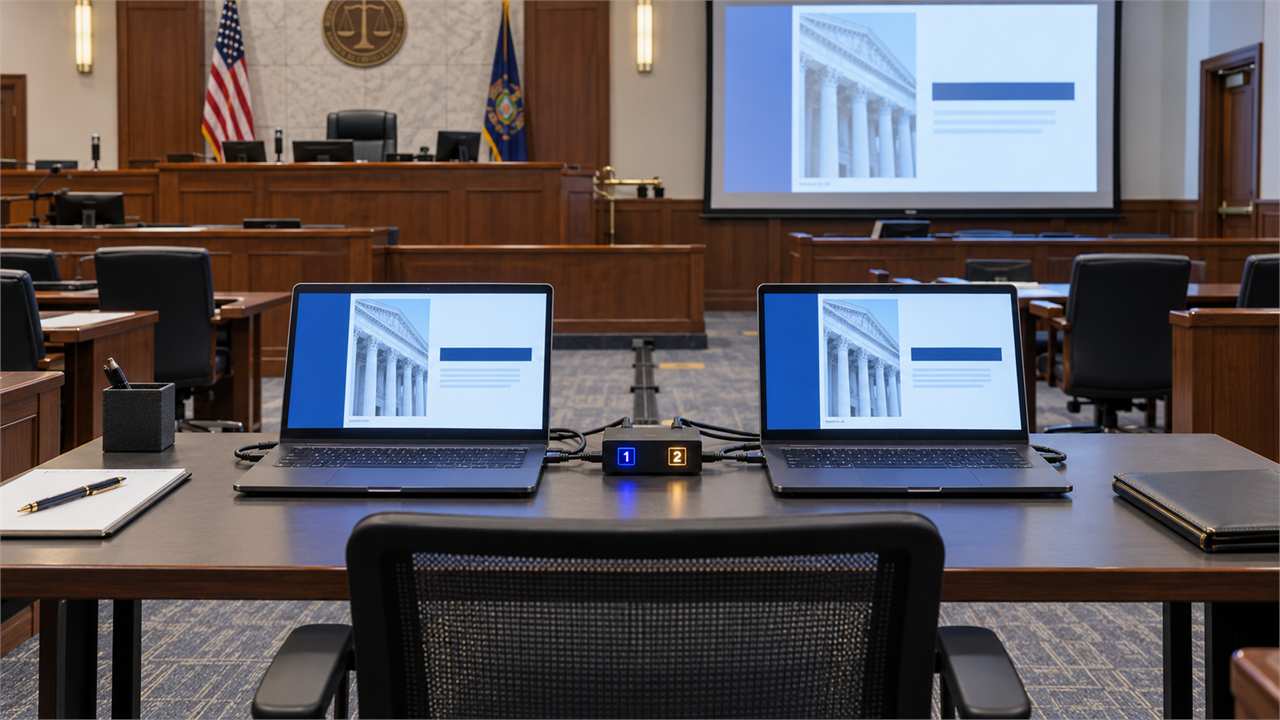
Prepare for courtroom technology failure with two complete, mirrored presentation systems connected through a tested A/B switch. The trial technician in the hot seat should be able to move immediately from the primary computer to the backup computer.
Both systems must contain the complete current case and should be synchronized at lunch and after each court day. Maintain organized local, cloud and hard-copy backups; duplicate the critical equipment; and keep an ELMO document camera available. Complete a full operational run-through in the courtroom the day before trial whenever permitted.
Key Takeaways
- Maintain two functioning, mirrored computers containing the complete current case.
- Connect both systems through a tested A/B switch for immediate changeover.
- Synchronize the systems at lunch and after each court day.
- Keep organized local, cloud and hard-copy versions of critical exhibits.
- Complete the courtroom setup and walkthrough before trial to confirm that every presentation path is working.
Build Two Complete, Mirrored Presentation Systems
In decades of courtroom presentation work, I learned that a backup must be able to present the case—not simply store files. Our trial setups used two complete computer systems connected through an A/B switch. If the primary computer failed, the trial technician could move to the mirrored system with the flick of a switch.
Mirrored systems should contain the same current data. For TrialDirector, that means the complete case file, exhibit list and every linked source file. A TrialPad workflow should include a second iPad containing the complete current case.
Keep another local copy on a portable drive, organized under the case name into folders such as Exhibits, Depositions, Video and Photographs. Cloud storage adds another layer only when synchronization and offline availability have been confirmed. Organized hard copies of critical exhibits provide an additional path.
The person in the hot seat handles the day-to-day presentation. Other people may help transport and set up the equipment, but the hot-seat technician should control both computers, the A/B switch and the presentation during trial.
Protect and Test the Entire Presentation Path
Duplicate the components whose failure could interrupt the presentation: computers, cables, adapters, power supplies and surge protectors. When the trial team supplies the projector, have a tested backup—ideally the same model as the primary projector. If the projector uses a replaceable lamp, carry a compatible spare and know how to install it.
Transport the equipment in protective hard-shell cases. Secure courtroom wiring with appropriate floor tape. Proper cable control protects the equipment, reduces a safety risk and maintains a professional courtroom appearance.
An ELMO document camera can be invaluable when the computers or presentation software become unavailable but the projector remains operational. Place the hard copy under the ELMO and display it directly on the courtroom screen. If counsel has pre-treated exhibits by adding callouts, arrows or highlights in advance, printed copies can preserve much of the intended presentation.
A duplicate printer or scanner is generally unnecessary. A hard copy or clear photograph can be displayed immediately through the ELMO and added to the digital case later when appropriate, if not already in the database.
Complete the courtroom setup and walkthrough at least the day before trial whenever access is available. Operate both computers through the A/B switch and confirm that either system reaches the monitors and projector. Project actual exhibits, play representative deposition clips, test both projectors and the ELMO, and confirm that the speakers are clear and free from distortion.
A complete courtroom walkthrough is one of the most effective ways to prepare for courtroom technology failure.
Ask whether the court would like a member of its staff to review the setup. Court personnel can confirm that the computers, monitors, projector, ELMO, speakers and wiring are positioned where the court permits. When appropriate, demonstrate that the presentation system and its backup path are functioning properly before trial begins.
The courtroom walkthrough helps identify equipment, placement, wiring or compatibility problems while there is still time to correct them.
Follow the judge’s procedures governing equipment connections and the display of materials.
Preparation should make the changeover almost invisible. The jury should remember the evidence—not the equipment failure.
Remember—you are the storyteller.
Related Articles
- Should You Still Use Foam Boards in a Digital Trial Presentation?
- How Can You Convert a Witness-Marked Foam Board into a Digital Trial Exhibit?
- When Should a Trial Exhibit Remain Visible on an Easel?
Learn More
- Trial & Deposition Technologies
- Mastering Courtroom Presentations with TrialDirector
- Mastering Trial Presentation with TrialPad: A Deep Dive into the LIT SUITE
- Don’t Overlook the Elmo: The Mighty Miniature Every Trial Tech Needs
- How Teaching Trial Technology Transformed a Generation of Trial Lawyers at Temple’s LL.M. in Trial Advocacy
About the Author — Thomas G. Oakes
Thomas G. Oakes is a 45+ year legal professional in Philadelphia and the founder/editor of PhillyLegalNews.com and PhillyLegalConnect.com. He served for many years as an official court reporter in the Philadelphia Court of Common Pleas and the U.S. District Court for the Eastern District of Pennsylvania, and has worked as a freelance court reporter in state and federal courts for decades.
He holds the highest national court reporter certifications through rigorous testing, including credentials from the National Court Reporters Association and multiple state associations, including Pennsylvania, New Jersey, Delaware, and Maryland. Tom was also the principal of Thomas G. Oakes Associates, a Philadelphia-based litigation support and trial technology firm serving attorneys nationwide for more than 33 years.
In addition to courtroom work, Tom is a nationally recognized leader in trial technology and a Certified TrialDirector Trainer. He has trained lawyers, judges, law clerks, paralegals, and trial teams in courtroom presentation and technology, and taught in Temple University’s LL.M. in Trial Advocacy program (with special recognition).
He has lectured at bar associations throughout Pennsylvania and nationally for organizations including the Federation of Defense and Corporate Counsel (FDCC), the International Association of Defense Counsel (IADC), and the American Bar Association (ABA). He is also a co-founder of the FDCC Evolve program and an instructor in the FDCC Deposition Boot Camp.
Award: Temple University LL.M. in Trial Advocacy — 2013 Faculty Award for “Art of Technology in the Courtroom.”
Disclaimer
This article is for general informational and educational purposes only and does not constitute legal advice. Reading this content does not create an attorney–client relationship. If you need legal advice about a specific situation, consult a qualified attorney in the appropriate jurisdiction.
About Philadelphia Legal News
Philadelphia Legal News is an educational publication dedicated to trial advocacy, legal technology, courtroom practice, and the history of the legal profession. Drawing on more than four decades of firsthand courtroom experience, Thomas G. Oakes shares practical insights, historical perspective, and commentary designed to benefit lawyers, judges, legal professionals, law students, and anyone interested in the evolution of the legal profession.